Separate application composition from reusable building blocks
Context
Network modules need reusable UI and services from packages such as @suite/intl and @trezor/product-components.
Importing a useful component from these packages can also pull in application state, routing, or concrete network implementations, creating a risk of tangled code and circular dependencies.
Important
We need to distinguish code that network modules can import from
@suite/*from code that assembles those modules into an application.
- Intl extraction: an example of lego extraction.
- Sign-verify modularization: work in progress demonstrating how the split applies to sign-verify.
Architectural rationale
Important
Separation of configuration from use: components (lego) implement behavior, while app code selects implementations, assembles their dependencies, and wires them into an application.
The wiring belongs in a Composition Root, the place near an application’s entry point where its dependencies are assembled. This is an application responsibility. In Suite, the web entry point @suite/web-app and desktop React entry point @suite/desktop-app-renderer already handle parts of this assembly. @suite/desktop-app handles Electron packaging and distribution. Registering concrete network modules is another part of that responsibility.
For this proposal, that means the app’s business logic is independent of how it is integrated into layouts, menus, and other app-specific structures.
- These components can be composed and tested with explicit dependencies.
- Platform-specific UI also belongs in lego packages when it can be used independently of application assembly.
- The package split makes this dependency direction visible and enforceable with
forbidden-deps.
Dependency inversion example
For sign-verify, dependency inversion means that the page and the network implementation both depend on an independent API contract. The diagram uses the same final package names as the full example below. Arrows point from a dependency to the code that imports it:
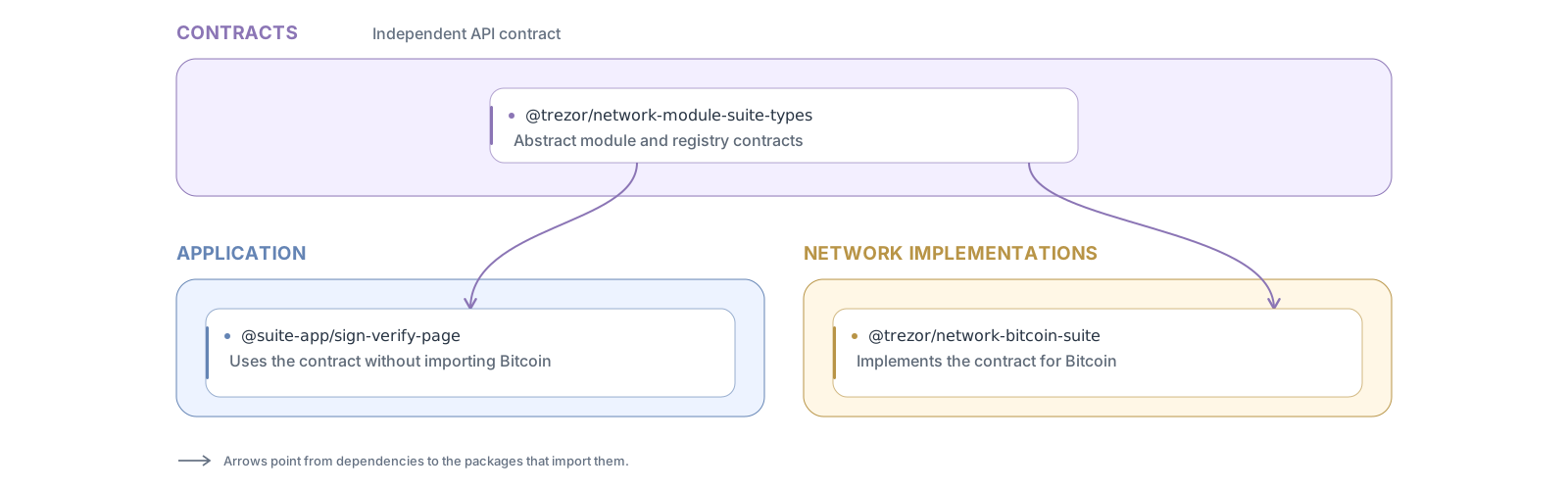
The composition root registers the concrete network modules and injects the module repository into the application. At runtime, SignVerifyPage in @suite-app/module-sign-verify obtains the selected module’s implementation through that repository. Its dependency on network functionality is expressed through the contract: it has no static import or type dependency on @trezor/network-bitcoin-suite or another concrete network implementation.
Decision
Separate code into folders according to its role in application composition:
- App code chooses and wires concrete implementations. It owns application navigation, state integration, and assembly of feature pages. Network modules cannot import app code.
- Lego code provides reusable building blocks that network modules and app code can both import.
How to distinguish app code from lego code
Think of wiring versus reusable parts. App code decides which parts an application uses and connects them: which screens appear in navigation, which network modules are registered, or which storage implementation a service uses. Lego code implements those parts, with explicit dependencies, without deciding how the application is assembled.
Ask: could another feature, network module, or application use this code by supplying its dependencies, without importing this application’s assembly? If yes, it belongs in lego. If it chooses implementations or connects features for this application, it belongs in app code. Reusable does not mean platform-independent, stateless, or limited to small utilities; a native component or a complete business feature can be a lego.
App modules
App code is grouped into one module package per section of the app: @suite-native-app/module-<section> on native and @suite-app/module-<section> on desktop and web, such as module-send or module-sign-verify. A module more or less corresponds to one section, usually one page, but it can hold several pages of the same section, such as buy, sell and exchange in module-trading.
- A module contains the section’s wiring: its pages, screens and navigation, and the section-specific code that assembles them from lego.
- Only app assembly imports a module:
@suite-native-app/app, or@suite-app/appand the application roots. Modules do not import each other; code two sections share belongs in lego.
Reading the dependency graph
Starting at application entry points, imagine separate trees of application wiring. Where those branches meet at shared dependencies, the tree picture becomes a directed acyclic graph: several consumers import the same reusable parts.
For example, these existing native packages share address UI. Here arrows mean imports:
                    @suite-native/app
                      /           \
                     v             v
         module-send                 module-receive       App: screen wiring
                     \             /
                      v           v
                 @suite-native/address                    Lego: address UI
This convergence helps identify lego candidates, but the number of importers is not the rule. A lego can have only one consumer today, and app wiring can be shared by several entry points. The deciding factor is whether the code provides a reusable part or assembles a particular application. Dependencies must remain acyclic; lego code must not import app assembly.
Examples in Suite
These examples use current package names and describe their intended roles after separation:
| Code | Role | Why |
|---|---|---|
@suite-native/module-*, such as module-send | App | Assemble screens, navigation, and application behavior from reusable parts. |
Composition in @suite-native/suite-sync | App | createSuiteSyncNativeCompositionRoot selects native Evolu/SQLite storage and wires it into Suite Sync. |
@suite/intl | Lego | Provides translation components and formatting that features and network modules can use without importing app assembly. |
@suite-native/address | Lego | Provides address label UI used by multiple features, independently of which screen hosts it. |
Existing packages can mix both roles. For example, @suite-native/suite-sync also exports UI hooks, and @suite-native/address currently imports its useSuiteSyncErrorHandler. The migration must separate reusable hooks from Suite Sync composition so address UI can use them without depending on app wiring. Classify the code by its responsibility, then split mixed packages along that boundary.
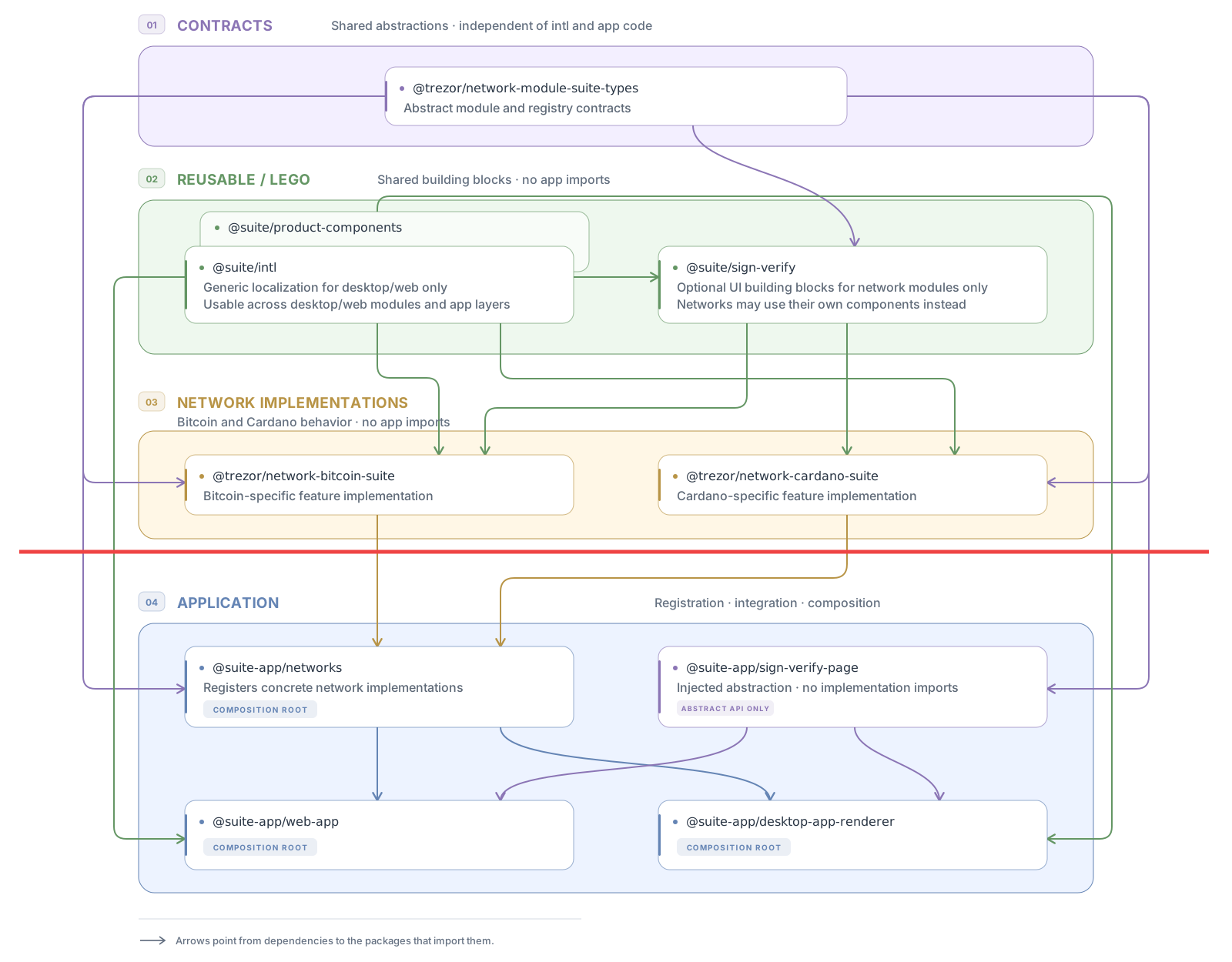
The diagram and layout below use the final package names after migration. For example, reusable code from @trezor/product-components is shown as @suite/product-components, and reusable sign-verify UI lives in @suite/sign-verify.
Practical steps
Note
This is an ongoing, opportunistic migration. We will move and split code when needed for development work, rather than reorganizing it for its own sake.
- Move app code directly from
@suite/*to@suite-app/*(suite-app/), and from@suite-native/*to@suite-native-app/*(suite-native-app/). Apply the same separation to other applications. Reusable code stays in its existing scope. - Do this opportunistically as development requires it, splitting mixed packages into app wiring and reusable parts when needed.
- Once a reusable package is separated from app wiring, allow
@trezor/network-<network>-suiteto import it from@suite/*, or@trezor/network-<network>-suite-nativeto import it from@suite-native/*. Its dependencies must also be independent of app assembly; each package can become available without waiting for the whole migration.
Final state example
Illustrative layout after the migration, showing a few packages from each layer:
├── networks/
│   ├── network-module/
│   │   ├── suite-common/
│   │   │   └── suite-common-types/     # Shared contracts
│   │   └── suite/
│   │       └── suite-types/            # Desktop/web contracts (purple in the diagram)
│   ├── bitcoin/                        # Implementation (orange in the diagram)
│   │   └── network-bitcoin-suite/      # Contains sign-verify components for Bitcoin
│   └── cardano/                        # Implementation (orange in the diagram)
│       └── network-cardano-suite/      # Contains sign-verify components for Cardano
├── suite/                              # Desktop/web lego (@suite/*)
│   ├── intl/
│   ├── product-components/
│   └── sign-verify/                    # Optional reusable UI for network modules
│                                       # (when two networks share some UI)
├── suite-app/                          # Desktop/web assembly (@suite-app/*)
│   ├── module-sign-verify/             # Sign-verify section wiring through module contracts
│   ├── networks/                       # Registers concrete network modules
│   ├── web-app/                        # Composition root
│   ├── desktop-app-renderer/           # Desktop React composition root
│   └── desktop-app/                    # Electron packaging and distribution
├── suite-native/                       # Native lego (@suite-native/*)
│   ├── accounts/
│   └── intl/
└── suite-native-app/                   # Native assembly (@suite-native-app/*)
    ├── module-accounts/
    ├── module-sign-verify/
    └── app/                            # Composition root
Network modules can import lego packages for their platform. App assembly imports and registers concrete network modules; reusable packages do not import app assembly.
Rejected alternatives
- Keep the current structure (status quo). Application assembly and reusable code remain mixed, making safe imports depend on developer knowledge. Cycle detection catches completed cycles, but does not prevent inappropriate dependencies from accumulating beforehand.
- Enforce boundaries in the existing layout and rename later. Tags, package allowlists and additional dependency checks could enforce the architecture, but require extra configuration while responsibilities remain less visible in directories and imports. Structural cleanup could be postponed indefinitely.
- Extend and enforce the native
module-*convention for all app packages. Application packages such asapp,stateandsuite-syncdo not naturally fit that prefix, so the prefix is used only for app sections, as described in App modules. This approach offers weaker structural visibility for a similar amount of migration work. - Extract reusable code into temporary
*-legoscopes, then rename everything. This introduces repeated moves and renames, and makes the final layout depend on completing the entire extraction. An opportunistic migration could leave these temporary scopes in place indefinitely.
Consequences
- ❗ Large migration. We need to move and split code across essentially the whole Suite codebase, separating reusable features and business logic from application assembly.
- Clear responsibilities. Application assembly is clearly separated from feature and business code, allowing reusable functionality to evolve independently of how an app composes it.
- Simple dependency rules. The package split makes it clear what can be imported where.
forbidden-depscan enforce those boundaries through package scopes and directories.